
Installation · Meta Quest
Meta Quest Link (USB)
With the official Oculus desktop app and Meta Quest Link, you can use your Meta Quest 2, 3, or Pro wired to your PC.
First-time setup
On your PC
-
Download the Oculus desktop app to your PC: oculus.com/download_app.
-
Run the downloaded setup wizard to install the Oculus desktop app on your PC.
Starting ViRTUE with Quest Link
Follow the instructions in the Preparation section before you begin the steps below.
On your PC
- Start the PC and log in to your user profile.
- Open the Oculus desktop app on your PC.
On your VR headset
- Turn on your Meta Quest VR headset.
-
Connect a USB 3.0 cable to a USB 3.0 port on your PC. Connect the other end to your Meta Quest VR headset.
-
Put on your headset and press the Oculus/Meta button on your right Touch controller to open the main menu.

Position of the Oculus/Meta button -
Open the quick settings on the left side of the main menu.
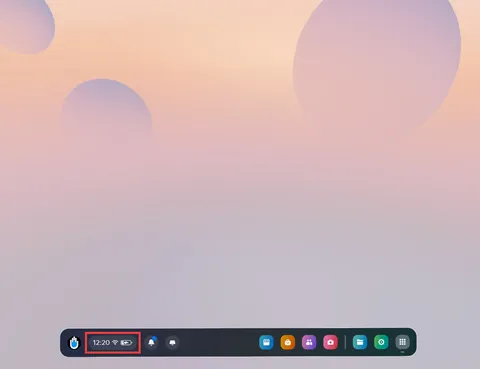
Quick settings in the main menu -
In the quick settings, select Quest Link.
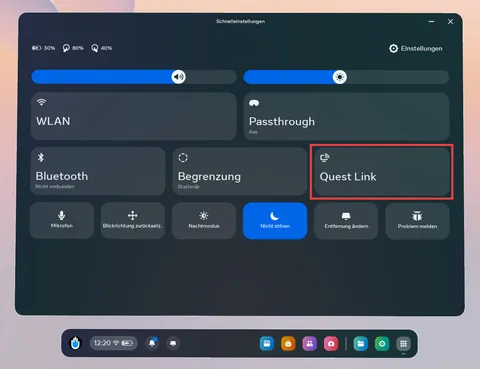
Quest Link in quick settings -
At the top of the Quest Link panel, turn off the Use Air Link toggle.
-
Select your PC from the Available Computers list.
-
Now select Launch to use Quest Link.
-
Wait until the Oculus desktop environment appears in the headset.
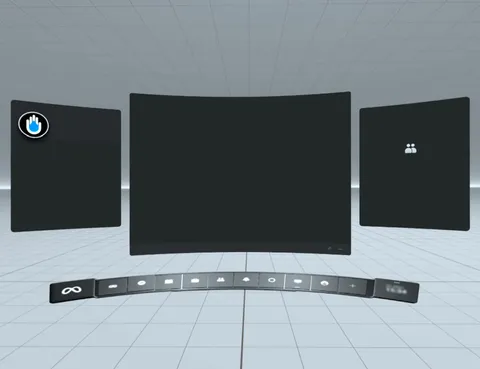
Oculus Desktop inside the headset -
Switch to the library.
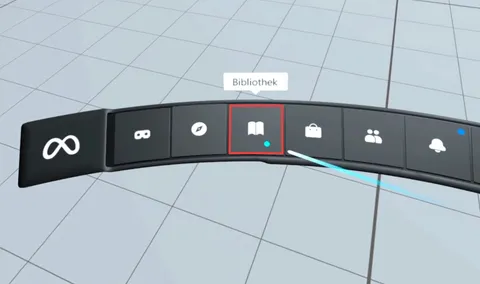
Library in the Oculus Desktop environment -
Start SteamVR. Once you are in this dark world, you can take off the VR headset.

SteamVR is connected
On your PC
- Now switch to your PC.
- Start ViRTUE.
On your VR headset
- Now switch back to your VR headset.
-
Wait until ViRTUE has started.
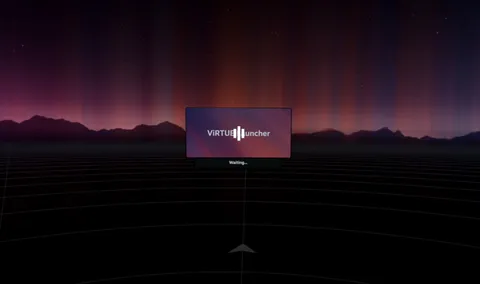
ViRTUE is starting -
Once you are in a bright cloud world, you have successfully started ViRTUE.

ViRTUE has started successfully
Troubleshooting
The Enable Link pop-up window does not appear in the Oculus desktop app.
Sign out of the Oculus desktop app and sign back in.
Note: Your headset must be plugged in for the Enable Link pop-up window to appear.
The Enable Quest Link option does not appear under Settings on my headset.
Restart your Quest VR headset. You can find a guide here: meta.com/help/quest/articles/…/restart-oculus-quest-2/.
I have a problem with my Meta Quest VR headset.
If you run into problems while using your Meta Quest VR headset, you can either search for answers in the Meta Quest Community Forum or contact Meta Support.