
The ViRTUE App · Settings
Scoring
Here you define how a session is graded, how many points are deducted for errors or a longer completion time, and when the user receives how many stars.
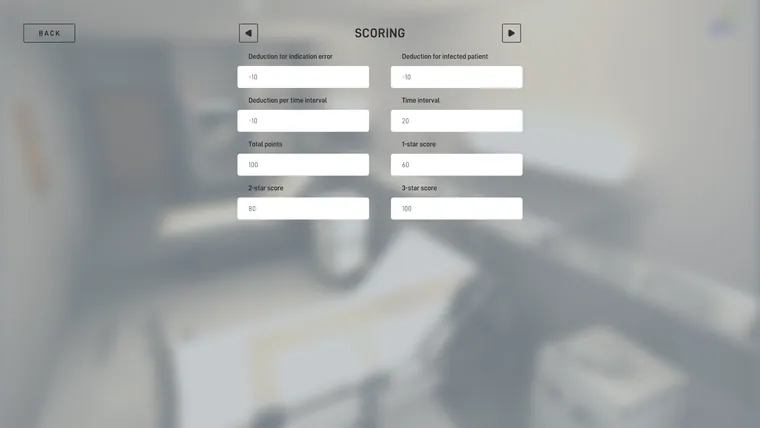
In this area you define how a session is graded. You can determine how many points are deducted for certain errors or for a longer completion time. The star rating at the end of the visit is derived from the points achieved.
Deduction for indication error
Defines how many points are deducted for an indication error. An indication error occurs when a required hand disinfection is not carried out at the right time.
The value is entered as a point deduction, for example -10. The default is -10 points.
Deduction for infected patient
Defines how many points are deducted when a patient is infected during the visit. The point deduction is applied only once per patient. If the same patient is infected again later, no further points are deducted for it.
The value is entered as a point deduction, for example -10. The default is -10 points.
Deduction per time interval
Defines how many points are deducted per time interval over the set duration of the visit (see Configure session -> Duration). This value is used to factor the time taken into the grade.
The value is entered as a point deduction, for example -10. The default is -10 points.
Time interval
Defines the length of a time interval in seconds. Together with the Deduction per time interval setting, this value determines how many points are deducted when the user exceeds the set duration of the visit.
The deduction is calculated only for the time that exceeds the set duration. Partial time intervals are counted as full time intervals.
The default is 20 seconds.
Calculation example:
The duration of the visit is set to 180 seconds. The time interval is 20 seconds and the deduction per time interval is -10 points. If the user takes 225 seconds for the visit, the deduction is calculated as follows:
- 225 - 180 = 45 seconds over the limit
- 45 / 20 = 2.25 time intervals
- 2.25 time intervals are rounded up to 3 time intervals
- 3 × -10 = -30 points
So in this example the user is deducted 30 points.
Total points
Defines the maximum number of points a user can achieve in a session. The defined deductions are subtracted from this total.
The default is 100 points.
1-star score
Defines the minimum number of points that must be achieved to receive a 1-star rating. The default is 60 points.
2-star score
Defines the minimum number of points that must be achieved to receive a 2-star rating. The default is 80 points.
3-star score
Defines the minimum number of points that must be achieved to receive a 3-star rating. The default is 100 points.