
The ViRTUE App
Configure session
You can customise each session individually, from how germs are visualised and how scoring works to the time available.
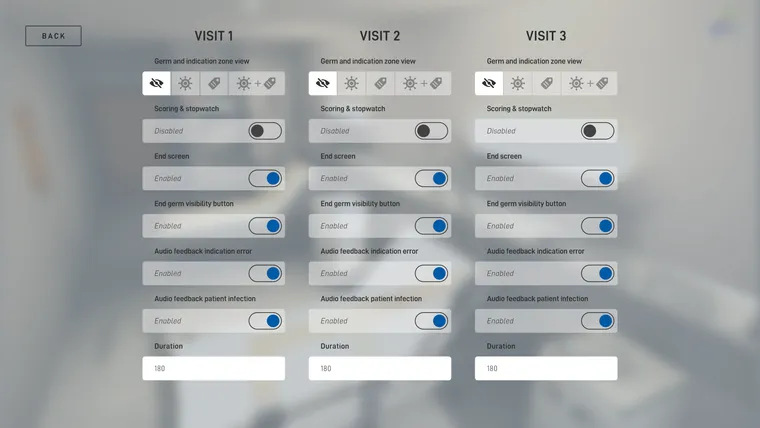
Germ and indication zone view
Determine whether germs or indication zones should be visualised. You can decide whether only germs, only indication zones, or both at the same time should be visualised. Alternatively, you can also disable the visualisations entirely.
Scoring & stopwatch
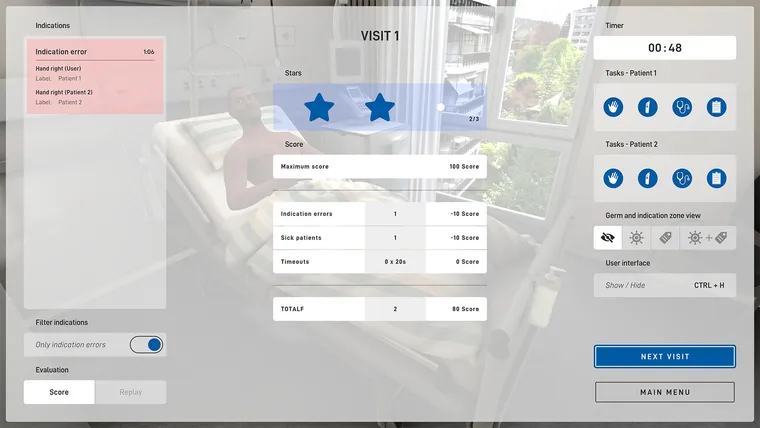
When enabled, the session is scored and the time is measured. The timer is visible to the user on the walls of the patient room; the operator sees it in the right-hand column of the screen. At the end of the session, a scoring screen is shown to both.
End screen
When enabled, a text is shown to the user at the end of the session.
End germ visibility button
When enabled, a green button appears on the table in the patient room at the end of the session, allowing the user to switch the germ view on and off themselves.
Audio feedback indication error
When enabled, an audio effect audible to the user is played on every indication error.
Audio feedback patient infection
When enabled, this audio feedback produces wheezing breathing in the infected patient.
Duration
Here you enter the time in seconds that is available to the user in this session. This value is relevant if scoring is enabled.
After making changes, click the Back button in the top left to save the settings, then click the Start session button.
For more details on scoring, see Scoring.